CLI reference
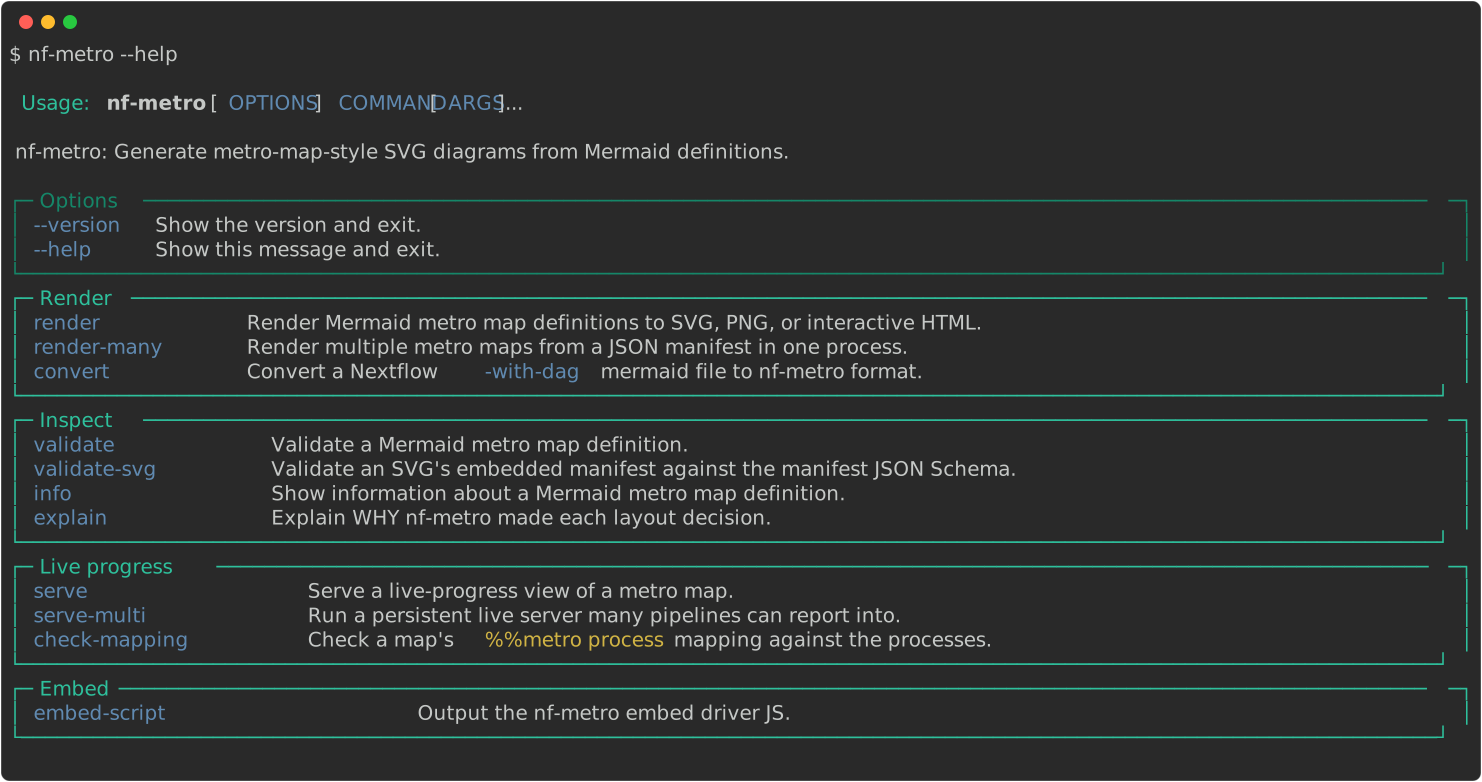
nf-metro ships eleven commands.
| Command | What it does |
|---|---|
render | Render one or more .mmd files to SVG or interactive HTML |
render-many | Render a JSON manifest of render jobs in one process |
convert | Convert a Nextflow -with-dag Mermaid file to nf-metro format |
validate | Check a .mmd file for errors without producing output |
info | Show what nf-metro parsed and derived from a map |
explain | Show why the layout engine made each decision |
serve | Serve a live-progress view of one map |
serve-multi | Run a persistent live server many pipelines can report into |
check-mapping | Check a map’s %%metro process: mapping against a pipeline |
validate-svg | Validate a rendered SVG’s embedded manifest and drawn geometry |
embed-script | Print the embed driver JS for a host page |
nf-metro --version prints the installed version.
Every command also takes --help.
Terminal output
Section titled “Terminal output”Help, errors, warnings, and progress are rendered in colour with rich-click, with warnings and errors grouped into yellow and red panels.
render’s and info’s YAML results go to stdout, with warnings, summaries, and progress on stderr, so a caller can parse either command’s stdout without picking through human-readable text.
Other commands print their result to stdout as they always have.
Piped stdout is never coloured.
nf-metro render
Section titled “nf-metro render”Render a Mermaid metro map definition to SVG or interactive HTML.
nf-metro render [OPTIONS] INPUT_FILE...Accepts one or more INPUT_FILEs.
Given more than one:
- They all render in the same process, which amortizes interpreter and import startup across the batch.
- Each writes to its own sibling
<input>.<format>. - Every file is attempted even if an earlier one fails.
- Successful outputs are kept, and the command exits non-zero if any file failed.
A rejected input, and any other failure, surfaces as a plain error message rather than a traceback.
Set NF_METRO_DEBUG=1 to re-raise the original exception instead.
An empty file, or one whose graph block holds no stations, is rejected by name rather than drawn.
On success, render prints the version, the source it read, and the files written to stdout as one YAML document.
Stdout stays empty on any failure, so a caller can parse it without also checking the exit code.
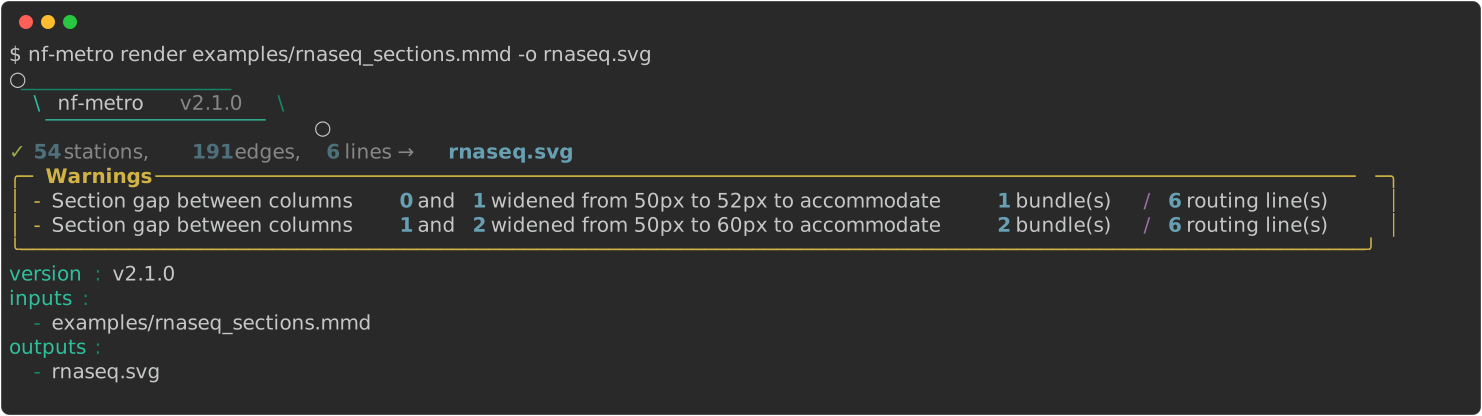
inputs is always a list, even when one map was rendered.
A path is quoted only where a bare word would not read back as the same string.
Most of the options in this section have a %%metro directive twin.
An explicit flag overrides the directive.
See the precedence table in the guide.
Output and source
Section titled “Output and source”| Option | Default | Description |
|---|---|---|
-o, --output PATH | %%metro output:, else <input>.<format> | Output file path (only valid with a single INPUT_FILE). Repeat it to write several formats from one run: -o map.svg -o map.png. With no -o, the map’s %%metro output: directive supplies the path(s), each with its own per-output overrides; with neither, the sibling <input>.<format> |
--format [svg|html|png|gif|webp|mp4|webm] | inferred from --output, else svg | Output format: svg, png, html for an interactive self-contained page, or gif/webp/mp4/webm for a looping video. -o map.png selects PNG on its own |
--from-nextflow | off | Convert Nextflow -with-dag Mermaid input before rendering |
--debug / --no-debug | off | Show the debug overlay (ports, hidden stations, edge waypoints) |
--reject-output-outside-source / --no-reject-output-outside-source | off | Refuse a %%metro output: declaration that resolves outside the pipeline repository holding the .mmd (an absolute path, or a .. escape past the repo root), or into its .git/, instead of writing there. Outside a git working tree the boundary falls back to the .mmd’s own directory. Never applies to an explicit -o. Meant for rendering a map you didn’t author, e.g. a CI job rendering a fork PR’s .mmd |
Per-output render overrides
Section titled “Per-output render overrides”A %%metro output: path may carry its own render settings after a |, so one
nf-metro render pass writes several differently-configured files with no CLI
flags at all:
%%metro output: nf-core-demo_metro_map.svgEverything right of the first | overrides this output alone.%%metro output: nf-core-demo_metro_map_animated.svg | animateA key=value token. mode=dark is --mode dark.%%metro output: nf-core-demo_metro_map_dark.png | mode=dark%%metro output: nf-core-demo_metro_map_light.png | mode=lightRight of the first | is a space- or comma-separated list of key=value
tokens; animate may also be written bare, meaning animate=true. An
override applies to every path on its own line and beats the matching global
flag for that output alone. Only options that change how the map is drawn
are accepted — nothing here can change what the map is, so every declared
output is the same diagram:
| Key | Equivalent flag | Example |
|---|---|---|
animate | --animate | animate, animate=false |
mode | --mode | mode=dark |
theme | --theme | theme=seqera |
scale | --scale | scale=3 |
raster_width | --raster-width | raster_width=800 |
An unknown key, or a value the matching flag would reject, is warned about and ignored; the output itself still renders under the run’s global options.
mode and theme are baked when the SVG is serialized rather than when the
map is laid out, so the static SVG and both PNGs above share a single layout
run — only the animated SVG needs one of its own. Four files, two layouts.
Theme and branding
Section titled “Theme and branding”| Option | Default | Description |
|---|---|---|
--theme [dark|light|nfcore|nfcore-dark|nfcore-light|seqera|seqera-dark|seqera-light] | from style:, else nfcore | Visual theme. A bare brand name (nfcore, seqera) takes the mode from --mode, and the suffixed names pin a mode. dark is a legacy alias for nfcore. Takes the same names as its directive twin %%metro style:, but exactly as spelled here. An unknown or wrong-case name exits with an error, where the directive warns and falls back |
--mode [light|dark] | from mode:, else dark | Display mode, independent of the brand. Bakes the chosen mode’s palette. Use it for light or dark PNG export. Directive twin: %%metro mode: |
--logo PATH | none | Logo image path (errors if the path does not exist). Directive twin: %%metro logo: |
--title TEXT | from title: | Pipeline title. Directive twin: %%metro title: |
--caption TEXT | none | Free-text caption or attribution line rendered bottom-left of the map (for example, Adapted from Author et al., Journal (Year)). Directive twin: %%metro caption: |
--theme light is the transparent embed theme rather than a brand.
Because it has no light/dark pair, --mode does not apply to it.
Legend and logo
Section titled “Legend and logo”| Option | Default | Description |
|---|---|---|
--legend TEXT | auto | Position the legend and logo block: keyword (bl/br/tl/tr/bottom/right/none), <keyword> | canvas, <keyword> | dx,dy, or absolute x,y |
--logo-scale FLOAT | 1.0 | Scale the logo within the legend block (1.0 = default auto-size) |
--legend-min-height FLOAT | 0 | Minimum legend content height in pixels (useful for single-line maps where the logo would otherwise be tiny) |
--legend-logo-gap FLOAT | auto | Horizontal gap in pixels between the logo and the legend entries |
Layout
Section titled “Layout”| Option | Default | Description |
|---|---|---|
--line-spread [bundle|centered|rails] | bundle | How lines sharing a station relate vertically: bundle merges them onto one trunk, centered balances the bundle about the midline, rails draws parallel rails with interchange stations. Overrides the graph-wide directive. Per-section %%metro line_spread: overrides stay |
--x-spacing FLOAT | auto | Horizontal spacing between layers (auto widens from 60 only when wide labels would otherwise collide) |
--y-spacing FLOAT | auto | Vertical spacing between tracks (auto is derived from the map’s content so captioned icons and dense labels do not collide) |
--section-x-gap FLOAT | 50 | Horizontal gap between sections |
--section-y-gap FLOAT | 50 | Vertical gap between sections |
--track-gap FLOAT | 1 | Visual gap in pixels (0 to 3) between adjacent line strokes in a bundle, edge to edge rather than center to center. 0 means the lines touch. Values above 3 are rejected |
--fold-threshold INTEGER | 15 | Max station-columns a section row may reach before the auto-layout wraps it onto the next row. Raise it to keep a long horizontal trunk on one row |
--diamond-style [straight|symmetric] | straight | Fork-join (diamond) layout: straight keeps the top branch on the main track, symmetric fans the branches evenly |
--line-order [definition|span] | definition | Line ordering for track assignment: definition preserves .mmd order, span gives longest-spanning lines inner tracks |
--row-align [content|top] | content | Section box vertical sizing within a shared grid row: content hugs each section’s own content, top grows shorter row-mates upward so their box tops and header badges sit flush with the tallest section in the row |
--center-ports / --no-center-ports | off | Center inter-section ports on the shorter of the two connected sections. Lines then enter and exit at the visual midpoint |
--compact-offsets / --no-compact-offsets | off | Size each station only for the lines actually passing through it, rather than reserving a slot for every declared line |
--label-angle FLOAT | theme default (0) | Angle in degrees for station labels (0 = horizontal). Useful for dense trunks where horizontal labels collide |
--font-scale FLOAT | 1.0 | Scale every text size and the label-width metrics that drive layout spacing |
--stroke-scale FLOAT | 1.0 | Scale track stroke weight and station pill size, widening bundle spacing, marker clearance, and rail pitch to match |
--scale FLOAT | 2.0 png, 1.0 video | Raster formats only: multiply the rendered pixel dimensions |
--raster-width INTEGER | auto | Raster formats only: output width in pixels, height scaled with it. Overrides --scale. Resizes the picture, unlike --width |
--width INTEGER | auto | Output width in pixels. Grows the SVG canvas around a map drawn at its natural size; it does not scale the map |
--height INTEGER | auto | Output height in pixels |
Numeric options are validated as follows:
- Spacings, scales,
--fold-threshold, and output dimensions must be greater than 0. - The section gaps,
--track-gap,--legend-min-height, and--legend-logo-gapalso accept 0. - Every numeric option requires a finite number, and
nanandinfare refused.
A flag given an out-of-range value exits with an error, while the equivalent %%metro directive warns and keeps the default.
Line styling
Section titled “Line styling”| Option | Default | Description |
|---|---|---|
--inactive-lines TEXT | from line: directives | Comma-separated line IDs to render inactive: their strokes, chevrons, and legend swatches gray out, as do the stations, labels, and terminus icons touched only by inactive lines. Unknown IDs error. Fully replaces the map’s inactive-marked lines. An empty value forces every line active. Does not edit the .mmd |
--animate / --no-animate | off | Add animated balls traveling along the metro lines. A video output turns this on for you |
--fps FLOAT | 12 | Video formats only: frames per second of the exported loop |
--duration FLOAT | the map’s cycle | Video formats only: length of one loop in seconds, compressing (or stretching) the map’s own animation cycle into it |
--directional / --no-directional | off | Draw static chevrons along each route pointing in the flow direction (source to target) |
Live-progress metadata
Section titled “Live-progress metadata”These carry into the rendered SVG’s manifest and drive live progress. They do not change the drawn map.
| Option | Default | Description |
|---|---|---|
--auto-process / --no-auto-process | off | Map each station to its own id as a default process pattern when it has no explicit %%metro process: directive. A map whose station ids already name their Nextflow processes then lights up live with no per-station mapping. Explicit directives override the default |
--process-scope TEXT | none | Common fully-qualified-name prefix shared by the pipeline’s processes (for example, NFCORE_RNASEQ:RNASEQ). Each %%metro process: value is then the tail under this scope, joined as <scope>:<tail> and matched literally. A pasted process path then needs no regex. Without a scope, process: values stay regexes |
Guard behavior
Section titled “Guard behavior”| Option | Default | Description |
|---|---|---|
--validate | off | After rendering, fail if the render-geometry guards find a defect in the produced SVG: a route drawn through a station’s label or marker, or two lines collapsed onto one stroke. Tier-A layout-invariant violations stay warnings here, and --strict fails on those. SVG output only, and only for a map that keeps its manifest. The guards read the drawn geometry through that manifest |
--strict / --no-strict | off | Treat a Tier-A layout-invariant violation on the rendered geometry as an error (non-zero exit) instead of a warning |
--permissive / --no-permissive | off | Downgrade layout and render guard failures to warnings and render best-effort on whatever geometry was computed, instead of aborting with no output. Overrides --strict |
Warnings
Section titled “Warnings”A map that parses with complaints, such as an unknown %%metro directive or a non-LR primary direction, is still written.
So is a layout that widens a gap to fit its routing.
Each complaint appears as a bullet in a yellow Warnings panel on stderr.
A geometry guard that was downgraded rather than enforced gets its own Guard downgrades panel, because those name geometry that was drawn anyway and may be defective.
Read them differently from a warning about something ignored or adjusted.
Embedding options
Section titled “Embedding options”Flags for producing an SVG to embed in another page or application. The Embedding guide explains when to use each.
| Option | Default | Description |
|---|---|---|
--responsive / --no-responsive | off | Emit viewBox only (no fixed width/height) for CSS-scalable embedding |
--embed-font / --no-embed-font | off | Inline a subset of Inter as a base64 @font-face block so the SVG renders identically on any host regardless of installed fonts |
--text-to-paths / --no-text-to-paths | off | Convert all text to vector paths, removing font dependencies entirely. Loses selectable text, and needs the font extra (pip install "nf-metro[font]") |
--bare / --no-bare | off | Omit the title and outer padding so the canvas hugs the diagram content (the attribution watermark is kept) |
--svg-class-prefix TEXT | none | Prefix every SVG presentation class with this string (for example, myapp produces myapp-nf-metro-station). Use distinct prefixes for each map on a shared page. No effect on the interactive HTML output, which already scopes each map |
--no-self-color-scheme | off | Omit color-scheme: light dark from the root <svg>. Use when inlining into a host page that owns the theme. The SVG then inherits the page’s color-scheme, and a manual toggle drives light-dark() resolution rather than the viewer’s OS preference |
--no-dark-mode-css | off | Suppress the prefers-color-scheme: dark <style> block when a host page manages its own theme and the injected media query would conflict |
--no-chrome-css | off | Omit the chrome --nfm-* CSS custom-property <style> block. Colors still render, baked as presentation attributes, and only live host recoloring is dropped. Needed when rasterizing the SVG with an external tool that cannot parse var(). --format png applies it for you |
Every SVG carries the machine-readable data manifest, meaning the <metadata> block and the per-node data-node-* attributes.
Opt out per map with %%metro manifest: false.
A --manifest/--no-manifest flag pair backs that directive but is deliberately absent from render --help.
It is an internal escape hatch for a one-off render, used by nf-metro’s own docs-site rendering.
The directive is the supported control.
Interactive HTML output
Section titled “Interactive HTML output”--format html produces a self-contained .html file with the SVG inlined and a small JS and CSS layer.
It has no external dependencies and needs no network:
nf-metro render pipeline.mmd --format html -o pipeline.htmlThe page supports drag-to-pan, scroll-to-zoom, station hover tooltips, and a clickable line legend.
Clicking a line isolates it.
Stations and sections that do not carry that line are hidden, and the view zooms to the bounding box of what remains.
Click again, press Esc, or select Reset to restore the full view.
The page’s colours follow the map’s mode.
--mode fixes them, and with no mode they follow the viewer’s light/dark preference.
Embedding covers the snippet’s theming on a host page.
The Embed… button opens a panel with copyable inline-HTML, iframe, and static-SVG snippets. The Embedding guide covers responsive sizing, font portability, host theming, and progress overlays.
Looping video of the animation
Section titled “Looping video of the animation”--animate puts balls on the lines of an SVG, driven by CSS.
A rasterizer has no CSS clock, so exporting that motion means drawing the frames instead.
A .gif, .webp, .mp4, or .webm output path does exactly that, and turns the animation on for you:
nf-metro render pipeline.mmd -o pipeline.gif --duration 12 --fps 20The loop runs one full animation cycle and stops a frame short of repeating it, so it wraps with no stutter. Each ball is sampled from the same motion path the animated SVG drives it along, at the moment of the cycle that frame represents, and drawn behind the station markers as it is there.
--duration compresses (or stretches) the map’s own cycle into a set number of seconds; leaving it off keeps the balls at exactly the speed the SVG moves them, which for a large pipeline can be a 40-second loop.
--fps sets the frame rate.
--scale and --raster-width size the frames as they size a PNG, except that a video defaults to natural size where a still doubles.
Nothing is capped. Every frame is a full rasterization, though, so a long smooth loop of a large map costs real time: nf-metro quotes the frame count and frame size before it starts, and draws a progress bar while it works.
All four are muxed in-process by PyAV, which ships FFmpeg in its own wheels, so nothing has to be installed or found on PATH.
Output formats compares the four on size, quality, and where each one plays.
Validate the rendered geometry
Section titled “Validate the rendered geometry”Pass --validate to check the drawn SVG after rendering.
It exits non-zero if a route is drawn through a station’s label or marker, or if two distinct lines collapse into one stroke where they should run parallel.
It reads the geometry as it ends up on the page, after the per-line offsets and label shifts the layout applies.
It therefore catches defects the pre-render checks cannot see:
nf-metro render pipeline.mmd -o pipeline.svg --validateBecause the guards read the drawn SVG through its embedded manifest, --validate refuses a map that turns the manifest off with %%metro manifest: false rather than reporting a pass it never checked.
--validate covers those drawn-geometry guards only.
A Tier-A layout-invariant violation, such as two stations landing on the same coordinate, is reported as a warning and the map still renders.
Pass --strict to exit non-zero on one, or use nf-metro validate --with-layout to catch it before rendering at all.
To run the same geometry checks on an already-rendered SVG, use nf-metro validate-svg --geometry.
nf-metro render-many
Section titled “nf-metro render-many”Render multiple metro maps from a JSON manifest in one process, amortizing interpreter and import startup across the whole corpus. Output directories are created as needed. On partial failure, successful outputs are kept and the command exits non-zero.
nf-metro render-many MANIFEST_FILEMANIFEST_FILE is a JSON array of render jobs.
Each job is an object with the required input and output keys, plus any subset of the render options expressed as JSON keys:
| Key | Description |
|---|---|
input | Path to the source .mmd file (required) |
output | Path for the output file (required) |
format | "svg" (default) or "html" |
theme | Theme name (nfcore, light, seqera, and the mode-suffixed variants) |
mode | "light" or "dark". Bakes a concrete palette |
debug | Show the debug overlay (default false) |
logo | Logo image path (overrides %%metro logo:) |
line_spread | "bundle", "centered", or "rails" |
legend | Legend position keyword or coordinate |
from_nextflow | Convert from a Nextflow DAG first (default false) |
title | Pipeline title override |
responsive | Emit viewBox-only SVG (default false) |
embed_font | Inline the Inter @font-face subset (default false) |
text_to_paths | Convert text to vector paths (default false) |
svg_class_prefix | Prefix for SVG presentation classes |
no_self_color_scheme | Omit color-scheme on the root <svg> (default false) |
no_dark_mode_css | Suppress the prefers-color-scheme block (default false) |
no_chrome_css | Omit the chrome CSS custom properties (default false) |
bare | Omit the title and outer padding (default false) |
validate | Run the render-geometry guards (default false) |
inactive_lines | Line IDs to render inactive, as a comma-separated string or a JSON list. Omit the key to use the map’s own inactive-by-directive lines. Give [] to force every line active |
layout_options | Object of layout overrides, for example {"manifest": false, "x_spacing": 60} |
[Only input and output are required. { "input": "examples/rnaseq_auto.mmd", "output": "out/rnaseq.svg" }, { "input": "examples/sarek.mmd", "output": "out/sarek.svg", "mode": "light",Layout overrides nest under one key. "layout_options": { "x_spacing": 60 } }]nf-metro convert
Section titled “nf-metro convert”Convert a Nextflow -with-dag Mermaid file to nf-metro .mmd format.
Render the output with nf-metro render, or hand-tune it first.
nf-metro convert [OPTIONS] INPUT_FILE| Option | Default | Description |
|---|---|---|
-o, --output PATH | stdout | Output .mmd file path |
--title TEXT | none | Pipeline title for the converted output |
See Importing from Nextflow for details and examples.
nf-metro validate
Section titled “nf-metro validate”Check a .mmd file for errors without producing output.
The bare command runs graph-semantic checks: that every edge references a defined line, that every section points at stations that exist, and that the graph is acyclic.
nf-metro validate [OPTIONS] INPUT_FILE| Option | Default | Description |
|---|---|---|
--with-layout | off | Also run the layout engine with its full invariant suite, reporting any layout failure as an error instead of a traceback |
--strict | off | Treat warnings (for example, a non-LR primary direction) as errors |
A map with no stations is reported as a warning here, because render refuses to draw one.
nf-metro info
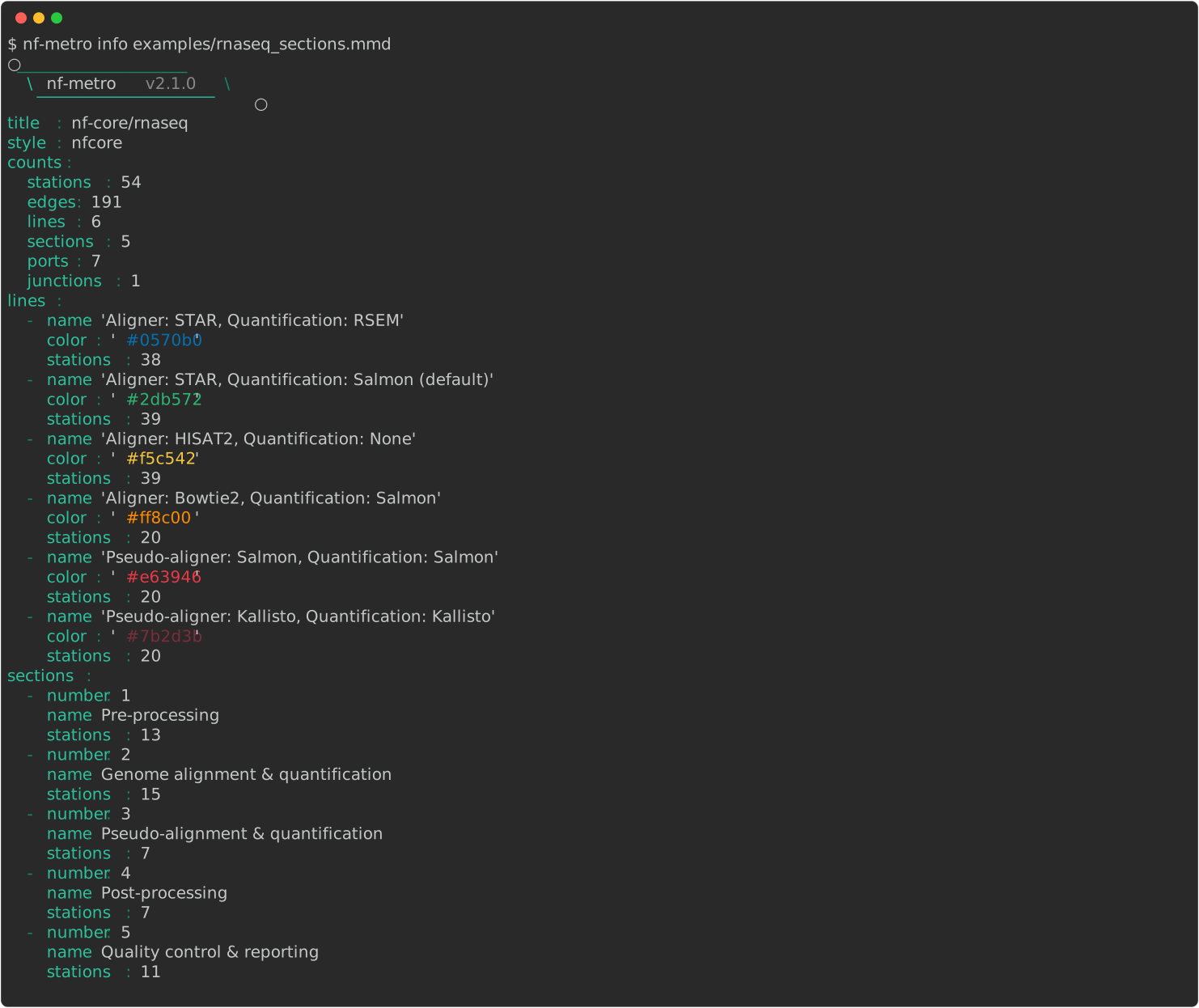
Section titled “nf-metro info”Show information about a parsed map: its sections, lines, stations, and edges. The default output is a stable YAML summary.
nf-metro info [OPTIONS] INPUT_FILE| Option | Default | Description |
|---|---|---|
--json | off | Emit the full introspection as JSON, for scripting |
--verbose | off | Add the section dependency graph, per-line routes, inferred auto-layout defaults, and synthetic ports and junctions to the text output |
Parse warnings print as a Warnings panel on stderr rather than into the stdout summary.
--verbose and --json carry them in the report itself instead.
style: reports the theme the map resolves to, using the same name render --theme accepts.
nf-metro explain
Section titled “nf-metro explain”Explain why nf-metro made each layout decision.
It names the rule that fired for each inferred choice, covering section direction, port sides, and fold and row layout.
It does the same for each synthetic element the engine inserted, such as fan-out junctions and bypass-V stations.
It pairs with nf-metro info, which shows what was built.
nf-metro explain [OPTIONS] INPUT_FILE| Option | Default | Description |
|---|---|---|
--json | off | Emit the full explanation as JSON |
--section SECTION_ID | none | Restrict output to decisions involving this section |
--station STATION_ID | none | Restrict output to decisions involving this station |
nf-metro serve
Section titled “nf-metro serve”Serve a live-progress view of a metro map.
INPUT_FILE may be a .mmd source or an already-rendered nf-metro SVG.
The map is rendered once and served at http://HOST:PORT/.
Point a Nextflow run’s weblog at the events endpoint to light up stations as tasks run.
nf-metro serve [OPTIONS] INPUT_FILE [-- LAUNCH_CMD...]%%metro process: directives in the map tie stations to processes, and only mapped stations change state.
Live progress covers the event format, the overlay styles, and the endpoints.
| Option | Default | Description |
|---|---|---|
--port INTEGER | 8080 | Port to listen on |
--host TEXT | 127.0.0.1 | Interface to bind. The default is local only. Use 0.0.0.0 to accept connections from other hosts |
--theme [dark|light|nfcore|nfcore-dark|nfcore-light|seqera|seqera-dark|seqera-light] | from style: | Visual theme, the same choices as render --theme |
--overlay [ring|pulse|dot|led] | ring | Status-overlay style shown until a viewer picks another in the page |
--token TEXT | none | If set, /events POSTs must supply ?token=... or an X-Metro-Token header |
--open | off | Open the live page in a browser |
--shutdown-after-complete | off | Stop the server shortly after the run’s completed or error event (or after the launched command exits) |
--shutdown-grace FLOAT | 10 | Seconds to keep the map up after the run finishes, with --shutdown-after-complete |
With an SVG input the map is served exactly as drawn.
--theme therefore applies only to a .mmd input.
Passing a LAUNCH_CMD after -- starts the run in one step with the weblog configured automatically:
nf-metro serve map.mmd --open --shutdown-after-complete -- \Everything after -- is the launch command. The weblog is added for you. nextflow run my/pipeline -profile dockerWithout a launch command, point the run at the server yourself:
nextflow run ... -with-weblog http://localhost:8080/eventsnf-metro serve-multi
Section titled “nf-metro serve-multi”Run a persistent live server that many pipelines can report into.
It starts with no map, unlike serve.
A pipeline registers its map by POSTing the .mmd to /maps, then sends weblog events to the run’s /r/<id>/events endpoint.
The index at http://HOST:PORT/ lists every run with a live status.
nf-metro serve-multi [OPTIONS]| Option | Default | Description |
|---|---|---|
--port INTEGER | 8080 | Port to listen on |
--host TEXT | 127.0.0.1 | Interface to bind. The default is local only. Use 0.0.0.0 to accept connections from other hosts |
--theme [dark|light|nfcore|nfcore-dark|nfcore-light|seqera|seqera-dark|seqera-light] | nfcore | Visual theme, the same choices as render --theme |
--overlay [ring|pulse|dot|led] | ring | Status-overlay style shown until a viewer picks another in the page |
--token TEXT | none | If set, POSTs to /maps and /r/*/events must supply ?token=... or an X-Metro-Token header |
The metro.server mode of the nf-metro Nextflow plugin does the register-and-emit automatically.
See Live progress.
nf-metro check-mapping
Section titled “nf-metro check-mapping”Check a map’s %%metro process: mapping against the pipeline’s real processes.
It reports processes the map cannot show, called drift, and station patterns that match nothing, called stale.
It exits non-zero if it finds either.
CI can therefore gate on map fidelity.
nf-metro check-mapping [OPTIONS] INPUT_FILE| Option | Default | Description |
|---|---|---|
--dag PATH | none | Nextflow -with-dag Mermaid file. Process names are read from its stadium nodes |
--processes PATH | none | Newline-delimited process names, for example captured from a run. Authoritative alternative to --dag |
--ignore TEXT | none | Regex for processes deliberately left unmapped (plumbing). Repeatable |
nf-metro validate-svg
Section titled “nf-metro validate-svg”Validate a rendered SVG’s embedded manifest against the manifest JSON Schema.
nf-metro validate-svg [OPTIONS] SVG_FILESchema validation needs jsonschema, which is not a runtime dependency.
It ships in the validate extra:
pip install "nf-metro[validate]"| Option | Default | Description |
|---|---|---|
--geometry | off | Also run the artifact-only render-geometry guards on the drawn ink (label strikes and non-consumer marker crossings), not only the manifest schema. The offset-collapse check needs the engine’s assigned offsets and runs only via render --validate |
nf-metro embed-script
Section titled “nf-metro embed-script”Print the attachMetroMap() embed driver JS to stdout.
Load it on a host page alongside an nf-metro SVG to get the documented interactive API.
nf-metro embed-script [OPTIONS]| Option | Default | Description |
|---|---|---|
-o, --output PATH | stdout | Write to a file instead of stdout |
See the embed contract for the driver API.