
Performance & Tuning
RustQC runs all RNA-seq QC analyses in a single pass over the BAM file. Because every tool shares the same BAM decode and per-read dispatch, the cost of each tool is not simply additive — there is a shared baseline cost for reading and decoding the BAM that all tools amortise together.
This page documents how much each individual tool contributes to the total runtime, how disabling tools affects performance, and how to tune thread counts for your hardware.
Recommendations
Section titled “Recommendations”- Leave all tools enabled unless you have a specific reason not to. The full run completes in ~10 minutes for a large BAM — far faster than running the equivalent traditional tools separately.
- Disabling TIN provides the single largest speedup. TIN’s large per-transcript data structures (~1 GB+) cause cache thrashing that slows every other tool in the pipeline. Removing it alone saves ~4 minutes (~38% of the total runtime).
- Disabling TIN + read_duplication together brings the runtime under 2.5 minutes.
- Thread count:
-t 4to-t 8is the productive range for a single human BAM. Beyond ~8 threads, runtime plateaus at roughly 2x speedup with increasing memory usage (see CPU scaling benchmarks below). - Multiple BAMs: the useful thread count scales with the number of input files (e.g. 4 human BAMs can productively use ~32 threads).
- Ensure a BAM index exists (
.bai/.csi). Without one, only a single counting thread is used regardless of-t.
Per-tool cost
Section titled “Per-tool cost”Benchmark setup
Section titled “Benchmark setup”The per-tool benchmarks were measured with the following setup:
| Parameter | Value |
|---|---|
| BAM file | GM12878 REP1, paired-end RNA-seq, GRCh38 (~186M reads, 10 GB) |
| Annotation | GENCODE v46 GTF (63,677 genes) |
| Hardware | Apple M1 Pro, 10 cores, 16 GB RAM |
| Threads | 8 (-t 8) |
| Build | cargo build --release (LTO, codegen-units=1, opt-level=3) |
| Strandedness | Reverse (-s reverse) |
| Mode | Paired-end (-p), all tools enabled by default |
The baseline is a run with every tool disabled (BAM decode + dispatch overhead only): 34 seconds.
Results
Section titled “Results”Each tool was benchmarked in isolation — a run with only that single tool enabled, all others disabled. The “marginal cost” is the difference between the single-tool run and the no-tools baseline.
| Tool | Run time (mm:ss) | Marginal cost (mm:ss) |
|---|---|---|
| read_duplication | 1:35 | 1:01 |
| infer_experiment | 0:53 | 0:19 |
| bam_stat | 0:52 | 0:18 |
| samtools_stats | 0:51 | 0:17 |
| idxstats | 0:50 | 0:16 |
| flagstat | 0:50 | 0:16 |
| qualimap | 0:48 | 0:14 |
| junction_annotation | 0:47 | 0:13 |
| inner_distance | 0:45 | 0:11 |
| preseq | 0:40 | 0:06 |
| tin | 0:39 | 0:05 |
| read_distribution | 0:35 | 0:01 |
| junction_saturation | 0:35 | 0:01 |
| dupradar | 0:35 | 0:01 |
| featurecounts | 0:33 | ~0:00 |
| All tools enabled | 10:37 |
Why don’t the marginal costs add up to 10:37? Two reasons. First, the shared BAM decode baseline (34s) is paid once regardless of how many tools are active. Second, and more significant, TIN has per-transcript data structures (
coveragearrays andunique_startshash sets for ~230K transcripts) that consume over 1 GB of RAM. When combined with the data structures of all other tools, the aggregate working set exceeds CPU cache capacity, causing cache thrashing that slows the per-read processing of every tool. TIN’s apparent marginal cost when run alone (5s) is low because TIN’s data structures alone still fit reasonably in cache. But in a full run with all tools active, adding TIN pushes the combined working set over a performance cliff.
All tools enabled
Section titled “All tools enabled”With every tool active, the total runtime is 10:37 using 4.5 GB peak RSS.
Cumulative removal: stripping tools by impact
Section titled “Cumulative removal: stripping tools by impact”Starting from a full run with all 15 tools, tools were removed one at a time. TIN and read_duplication are removed first (the two highest-impact tools), then remaining tools in order of marginal cost. Both wall-clock time and peak memory (RSS) are shown.
| Step | Tool removed | Tools remaining | Run time | Peak RSS | Delta |
|---|---|---|---|---|---|
| 0 | (none: all tools) | 15 | 10:37 | 4.5 GB | |
| 1 | tin | 14 | 6:37 | 4.5 GB | -4:00 |
| 2 | read_duplication | 13 | 2:22 | 2.7 GB | -4:16 |
| 3 | infer_experiment | 12 | 1:57 | 2.7 GB | -0:25 |
| 4 | bam_stat | 11 | 1:59 | 2.2 GB | +0:02 |
| 5 | samtools_stats | 10 | 2:01 | 1.8 GB | +0:02 |
| 6 | flagstat | 9 | 2:03 | 2.4 GB | +0:03 |
| 7 | idxstats | 8 | 1:39 | 2.2 GB | -0:25 |
| 8 | qualimap | 7 | 1:13 | 2.0 GB | -0:25 |
| 9 | junction_annotation | 6 | 1:02 | 1.8 GB | -0:11 |
| 10 | inner_distance | 5 | 0:49 | 1.4 GB | -0:13 |
| 11 | preseq | 4 | 0:40 | 1.0 GB | -0:09 |
| 12 | read_distribution | 3 | 0:39 | 1.0 GB | 0:00 |
| 13 | junction_saturation | 2 | 0:36 | 0.7 GB | -0:03 |
| 14 | dupradar | 1 | 0:37 | 0.7 GB | 0:00 |
| 15 | featurecounts | 0 | 0:35 | 0.6 GB | -0:01 |
Key observations
Section titled “Key observations”TIN’s impact is driven by memory pressure, not computation. When TIN is the only tool enabled, it adds just 5 seconds of marginal compute time. But in a full run, removing TIN saves 4:00. As explained above, TIN’s ~1 GB of per-transcript data structures push the combined working set past CPU L3 cache capacity, causing cache misses that slow every other tool’s per-read processing. Removing TIN shrinks the working set enough for the remaining tools to run efficiently.
read_duplication is the most expensive counting-phase tool. Removing it saves 4:16 (step 2), cutting the runtime from 6:37 to 2:22. This tool maintains per-read sequence hashing (SipHash over every base) for duplication detection, which is expensive in both CPU and memory.
The “samtools” group (bam_stat, flagstat, idxstats, samtools_stats) is cheap. These tools add minimal overhead individually because they compute simple per-read counters with no complex data structures.
Memory scales with enabled tools. Peak RSS drops from 4.5 GB (all tools) to 0.6 GB (no tools). The largest single memory consumers are TIN (~1 GB for per-transcript hash sets and sampled-position indices) and read_duplication (~1 GB for sequence hash tables).
Disabling tools
Section titled “Disabling tools”Individual tools can be disabled in the YAML config file. See the Configuration page for the full list of toggles.
When a tool is disabled, its accumulators are never constructed, its per-read processing is skipped entirely, and no output files are written. There is zero overhead for disabled tools - not just output suppression.
Effect of CPU count
Section titled “Effect of CPU count”RustQC speed is typically bound by CPU and disk I/O. It parallelises heavily across multiple CPUs to reduce wall-clock time.
RustQC parallelises by assigning chromosomes to worker threads — each worker opens its own BAM reader and processes its assigned chromosomes independently.
The number of chromosomes sets the theoretical ceiling for counting threads, but in practice returns diminish well before that limit because chromosomes aren’t split and have very different lengths - so the longest chromosome becomes the parallelisation bottleneck.
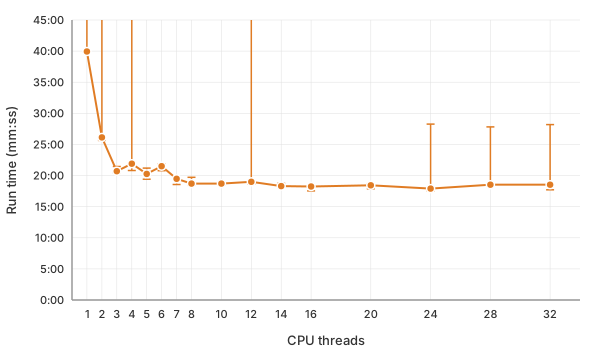
Performance plateaus at roughly 4-8 threads (~2x speedup). Additional threads beyond this point are used for BAM decompression and add little benefit while increasing memory usage (each worker maintains its own per-chromosome accumulators).
When multiple BAM files are provided, the thread budget is split across files, so the practical ceiling scales with the number of inputs.
A BAM index (.bai/.csi) is required for parallel mode. Without one, RustQC
falls back to a single counting thread.
CPU scaling benchmarks
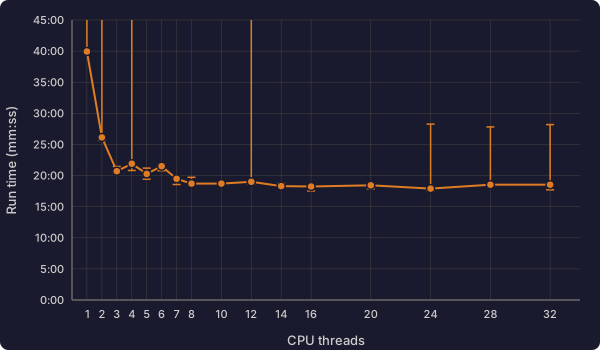
Section titled “CPU scaling benchmarks”Measured on AWS using the same GM12878 BAM (186M reads, 10 GB) with all tools enabled. Three replicates per thread count; the table shows the median run time (robust to cloud scheduling jitter).
| Threads | Run time | Peak RSS | Speedup vs 1 thread |
|---|---|---|---|
| 1 | 39:56 | 8.9 GB | 1.0x |
| 2 | 26:08 | 11.2 GB | 1.5x |
| 3 | 20:42 | 11.2 GB | 1.9x |
| 4 | 21:54 | 11.8 GB | 1.8x |
| 5 | 20:16 | 11.9 GB | 2.0x |
| 6 | 21:30 | 12.1 GB | 1.9x |
| 7 | 19:29 | 12.5 GB | 2.1x |
| 8 | 18:42 | 12.8 GB | 2.1x |
| 10 | 18:42 | 13.2 GB | 2.1x |
| 12 | 19:00 | 13.7 GB | 2.1x |
| 14 | 18:18 | 14.2 GB | 2.2x |
| 16 | 18:14 | 14.5 GB | 2.2x |
| 20 | 18:26 | 15.9 GB | 2.2x |
| 24 | 17:54 | 16.7 GB | 2.2x |
| 28 | 18:32 | 16.9 GB | 2.2x |
| 32 | 18:32 | 16.9 GB | 2.2x |
Performance scales well up to ~8 threads, where runtime drops from ~40 minutes (single-threaded) to ~19 minutes (2.1x speedup).
Beyond 8 threads, gains plateau because each chromosome is processed by exactly one worker — despite greedy bin-packing to balance load, the largest chromosome (human chr1, ~8% of the genome) becomes the critical path and cannot be subdivided. Additional threads beyond this point serve only as BAM decompression helpers, yielding diminishing returns. Peak RSS grows linearly with thread count as each worker maintains its own per-chromosome accumulators.